
[vc_row][vc_column width=”1/2″ css=”.vc_custom_1532334253632{padding-left: 5% !important;}”][vc_column_text css=”.vc_custom_1543415079251{margin-bottom: 0px !important;padding-left: 5% !important;}”]Meaningful Use – Cancer Reporting in California
The California Department of Public Health (CDPH) is coordinating all reporting for Meaningful Use(MU) for California. CDPH is utilizing a Health Information Exchange (HIE) Gateway to receive and process MU files. For more information on the CDPH HIE Gateway, please go to Health Information Exchange Gateway website.[/vc_column_text][/vc_column][vc_column width=”1/2″][vc_column_text css=”.vc_custom_1528786384524{margin-bottom: 0px !important;}”] [/vc_column_text][/vc_column][/vc_row][vc_row][vc_column][vc_column_text css=”.vc_custom_1543236664894{margin-bottom: 0px !important;}”]To participate in MU2 for Cancer Reporting, Physician Offices (PO) must meet the HL7 Clinical Document Architecture (CDA) 2.0 standard, and messages must conform to the CDA implementation specifications found in the Implementation Guide for Ambulatory Healthcare Provider Reporting to Central Cancer Registries. In addition, the technology used by the PO to generate the HL7 CDA. XML message has to be a Federally Certified 2014 Edition EHR technology. [/vc_column_text][/vc_column][/vc_row][vc_row][vc_column][vc_column_text css=”.vc_custom_1543236118819{margin-bottom: 0px !important;}”]
There are two transmission options for submitting MU2 data for Cancer Reporting:
- File Upload via Hypertext Transfer Protocol Secure (HTTPS)
- Secure File Transfer Protocol (SFTP)
If you do not know your transport method, please ask your Information Technology representative or your Electronic Health Record vendor prior to enrolling to submit MU2 cancer data.[/vc_column_text][/vc_column][/vc_row][vc_row][vc_column][vc_column_text css=”.vc_custom_1543415135655{margin-bottom: 0px !important;}”]Meaningful Use Stage 3
The California Cancer Registry is declaring its readiness to meet the Stage 3 Meaningful Use Cancer Measure for early adopters of Stage 3 Meaningful Use in 2017. CCR will be able to meet the 2015 Edition CEHRT criteria, including incorporation of the updated Cancer Implementation Guide
HL7 CDA ® Release 2 Implementation Guide: Reporting to Public Health Cancer Registries from Ambulatory Healthcare Providers, Release 1, DSTU Release 1.1 – US Realm[/vc_column_text][/vc_column][/vc_row][vc_row css=”.vc_custom_1543304842972{background-color: #b36093 !important;}”][vc_column][vc_column_text css=”.vc_custom_1547115219989{margin-bottom: 0px !important;padding-top: 2% !important;padding-left: 2% !important;}”]
Please Note:
The current Meaningful Use system does not meet cancer reporting requirements. If you participate in Meaningful Use, you must still report cancer cases directly to your cancer registry.
[/vc_column_text][/vc_column][/vc_row][vc_row][vc_column][vc_column_text css=”.vc_custom_1604701744307{margin-bottom: 0px !important;}”]———————————————————————————————————————————————–[/vc_column_text][/vc_column][/vc_row][vc_row][vc_column][vc_column_text css=”.vc_custom_1604701450192{margin-bottom: 0px !important;}”]Steps for MU Reporting Through CDPH[/vc_column_text][vc_toggle title=”STEP 1: Begin the online registration process” style=”round” color=”white” open=”true”]Begin the online registration process[/vc_toggle][vc_toggle title=”STEP 2: Create an account” style=”round” color=”white”]Follow the on-screen directions to create a new account and click “create account.”
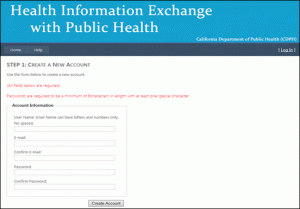 [/vc_toggle][vc_toggle title=”STEP 3: Receive email confirmation from HIE” style=”round” color=”white”]You will receive an email from HIEHelp@cdph.ca.gov, requesting confirmation of your registration. Click on the link provided in the email.[/vc_toggle][vc_toggle title=”STEP 4: Enter contact information” style=”round” color=”white”]Enroll for cancer reporting by filling in your contact information.
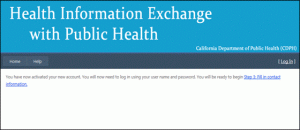 [/vc_toggle][vc_toggle title=”STEP 5: Log-in page” style=”round” color=”white”]You will automatically be redirected to the log-in page. You will be directed to create an account by clicking on a link.
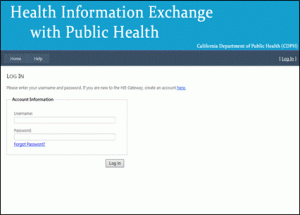 [/vc_toggle][vc_toggle title=”STEP 6: Enter your information” style=”round” color=”white”]You will be redirected to a page to enter your information as shown below. To proceed, complete the minimum fields, as indicated by asterisks and click “submit.”
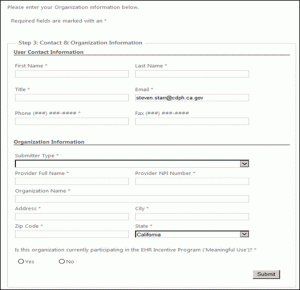 [/vc_toggle][vc_toggle title=”STEP 7: Manage Submissions page” style=”round” color=”white”]You will be redirected to the Manage Submissions page as shown below. Click “Enroll” for the California Cancer Registry (CCR).
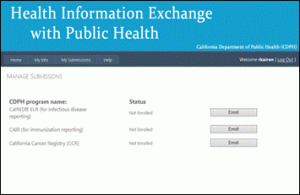 [/vc_toggle][vc_toggle title=”STEP 8: Supplemental Data page” style=”round” color=”white”]You will be redirected to the CCR Supplemental Data page. Answer the questions and click submit.
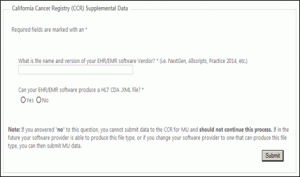 [/vc_toggle][vc_toggle title=”STEP 9: MU enrollment is pending” style=”round” color=”white”]The following screen will appear to indicate your MU enrollment application is pending.
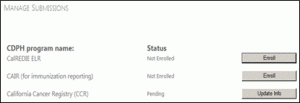 [/vc_toggle][vc_toggle title=”STEP 10: Enrollment confirmation” style=”round” color=”white”]Next, you will receive an email from CDPH HIE Gateway, letting you know that you have successfully enrolled with CCR. The email will provide you with directions and options for transmitting your data.[/vc_toggle][vc_toggle title=”STEP 11: Testing and validation” style=”round” color=”white”]
After registering, you must complete the testing and validation process. You will need to decide how you want to submit your MU cancer data. There are 2 options available to you that will allow the data to go directly to CCR:
After selecting your transmission option, you may submit HL7 CDA.XML files to CCR. For the Testing & Validation phase, you will be asked to submit 5 test messages that pass the CDC Validation process. Once your office has achieved this, you will then be moved to Production for ongoing data submission.[/vc_toggle][vc_toggle title=”STEP 12: Ongoing data submission” style=”round” color=”white”]You can begin ongoing data submission in compliance with MU for cancer reporting. While actively engaged in the steps above, you will be receiving emails and possibly telephone calls from CDPH HIE and CCR. You should maintain copies of these communications for EHR Incentive Program audit purposes.
If you have any questions regarding these processes, please contact our office at MU2CCRHelp@ccr.ca.gov.[/vc_toggle][/vc_column][/vc_row][vc_row css=”.vc_custom_1528716178318{padding-top: 5% !important;}”][vc_column][vc_column_text el_class=”color_violet” css=”.vc_custom_1530970520759{margin-bottom: 0px !important;}”]
More Information about MU Reporting
For more information about MU reporting, see the FAQ provided by CDPH.[/vc_column_text][/vc_column][/vc_row]